
ADR 1000-Points Calculator. More than just calculating points.
Select a UN number, check the appropriate ADR data record, calculate transport points and directly use relevant substance, special provision, marking and product information.
Free · no registration · multiple items ·
quantities with up to 2 decimal places · DE / EN
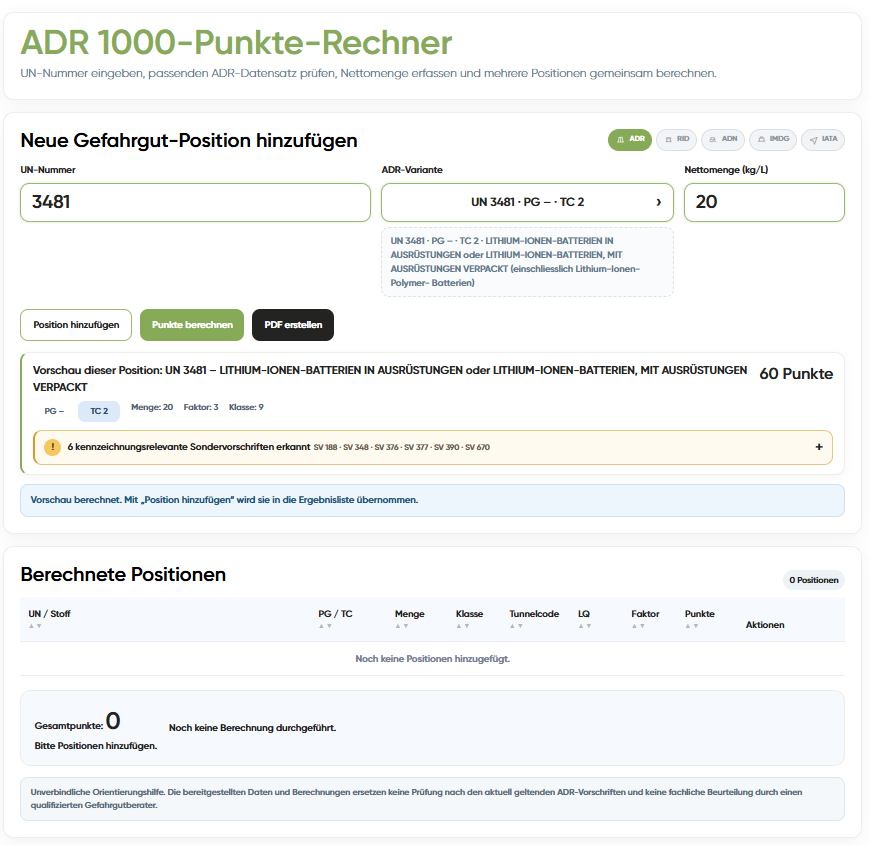
The 1000-points calculator that does not stop at the calculation.
Anyone searching for an ADR 1000-points calculator initially wants to know how many transport points a shipment reaches under ADR 1.1.3.6. In practice, further questions immediately follow: Which data record belongs to the UN number? What is the primary and subsidiary hazard? Which special provisions apply? Which marking fits the specific substance? This is why the BOXLAB calculator combines the points calculation with additional ADR information and suitable products.
One tool. Multiple work steps.
The calculator combines the conventional 1000-point calculation with ADR data record selection, decimal quantities, special provisions, marking and Shop integration.
UN numbers & variants
Identify multiple stored data records for a UN number and select the appropriate variant.
1000-point calculation
Enter multiple items and transparently calculate individual and total points.
Decimal quantities
Quantities can be entered with up to two decimal places and used in the calculation.
ADR substance data
Depending on the data record, display class, packing group, transport category, LQ, tunnel code and other information.
Primary & subsidiary hazard
Display hazards separately and take them into account in a differentiated way for marking and product assignment.
Special provisions
Display stored marking-relevant special provisions after the calculation as an additional review layer.
Suitable marking
Open placards, hazard labels, orange plates and other suitable BOXLAB products directly from the result.
Direct cart
Add mapped products directly to the Shopware cart without searching again.
Print / PDF
Output the result overview in a print-optimised format and save it as a PDF using the browser function.
From the UN number to the result.
A few steps take you from substance selection and calculation to special notices, marking information and a result overview that can be documented.
Enter UN number
Open the required UN number in the calculator.
Select data record
If several variants are available, select the technically appropriate ADR entry.
Enter quantity
Enter the relevant quantity – with up to two decimal places if required.
Calculate points
Run the calculation as a preview and then add it as an item.
Add items
Add further dangerous goods to the combined 1000-point calculation.
Check total result
Clearly review individual items and the total points.
Check special provisions & marking
Display stored special provisions and product assignments for the substance.
Document
Use the print view, save a PDF or continue with suitable products.
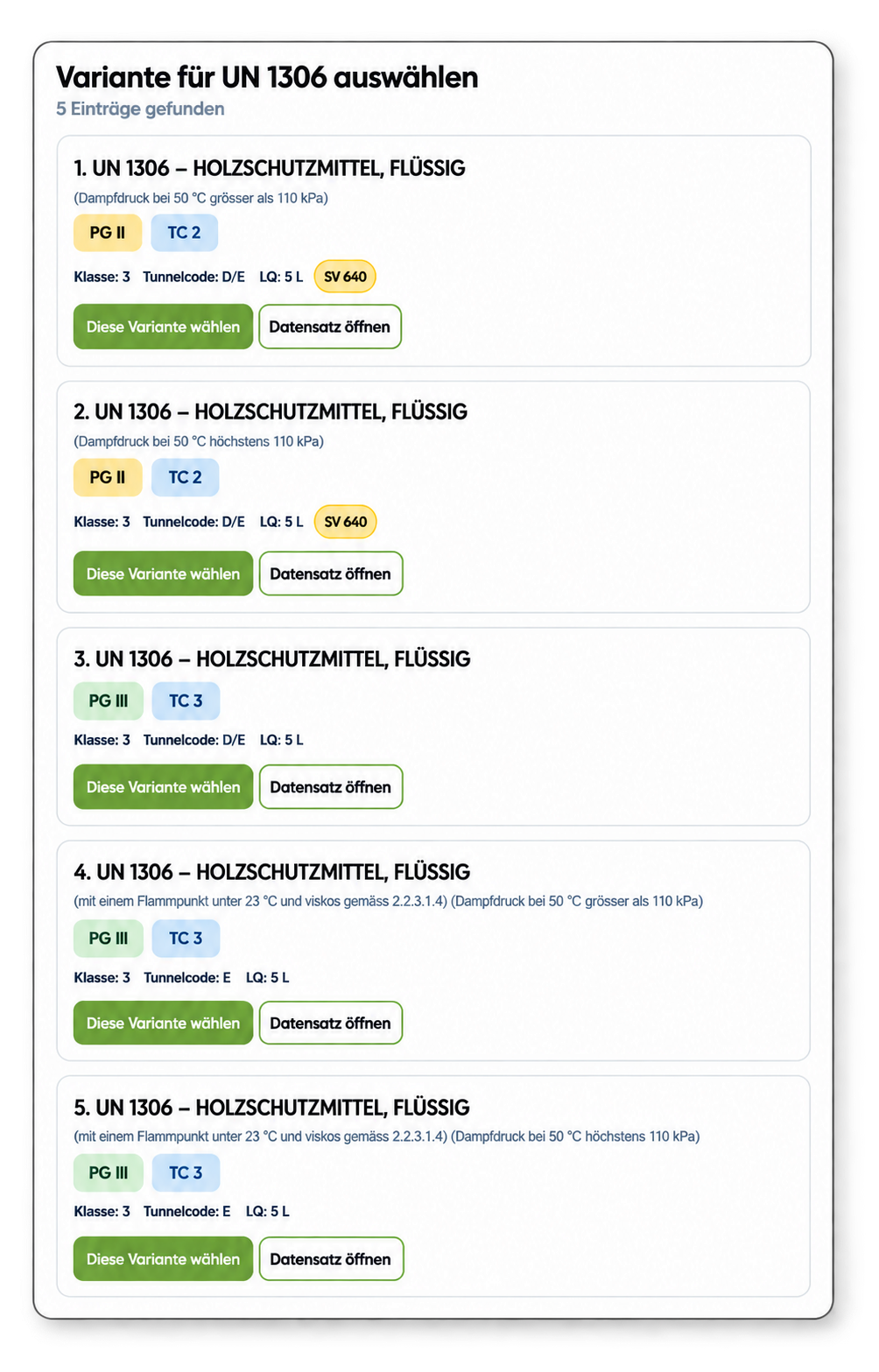
A UN number is not always just one data record.
Depending on the substance entry, several ADR variants may be stored under the same UN number. Differences may include packing group, transport category or other ADR characteristics. The BOXLAB calculator therefore lets the user select the specific data record first and then calculate the item.
- select the specific substance variant
- take the packing group into account
- understand transport category and factor
- display primary and subsidiary hazard separately
- open further stored ADR information
The points total is not the end of the review.
Special provisions may contain additional conditions, exemptions or specific marking requirements for individual UN numbers. Stored marking-relevant special provisions are therefore not hidden somewhere in a long data list in the BOXLAB calculator; they are displayed after the calculation as separate additional information.
Where suitable BOXLAB products or reference information are stored for a special provision, they can be linked directly to the item.
What the calculator supports
- display relevant stored special provisions for the selected UN variant
- clearly highlight marking-related information
- assign additional products or reference illustrations
- optionally include special provisions in the print/PDF output
- clear separation between the calculation and the additional technical review layer
Take dangerous goods marking one step further.
The calculation does not end with the points total. For stored data records, the calculator can display suitable BOXLAB marking products and link directly to the shop.
The familiar starting point remains. The tool goes further.
“ADR 1000-Points Calculator” is the established term for the practical calculation under ADR 1.1.3.6. That is exactly where the BOXLAB calculator starts. It then extends the points total with data record variants, additional ADR information, special provisions, marking products and a print-optimised result overview.
Open calculator →The calculation remains clearly focused on ADR.
The 1000-point calculation and the central substance selection are based on ADR for road transport. This is the technical basis of the calculator.
If individual results contain information relating to other regulations, this is displayed only as additional information and is clearly labelled as such. One example is a Proper Shipping Name with the relevant regulatory reference. This keeps it clear what is part of the ADR calculation and what is merely provided as supplementary context.
Technical guidance rather than automatic case-by-case approval
The BOXLAB ADR 1000-Points Calculator supports research, calculation and the selection of stored information. The output does not replace a review of the specific transport case or individual dangerous goods advice. Special provisions, conditions and other requirements may impose additional prerequisites that cannot be conclusively assessed from the UN number and quantity alone.
Frequently asked questions about the ADR 1000-Points Calculator
The most important questions about calculation, data record selection, decimal quantities, special provisions, marking and PDF.
Is the ADR 1000-Points Calculator free?
How does the 1000-point calculation under ADR 1.1.3.6 work?
Can I enter decimal quantities?
Can I calculate several dangerous goods together?
Why are several variants shown for some UN numbers?
What ADR information does the calculator display?
How are special provisions handled in the calculator?
Does the calculator show suitable hazard labels and placards?
Can I save the result as a PDF?
Does the calculator also display information relating to other regulations?
Does the calculator replace a dangerous goods expert?
Enter UN number. Check ADR data. Calculate points.
Start directly with the BOXLAB ADR 1000-Points Calculator.