Send Invoices Directly to the Right DepartmentSeparate Invoice Email Address:

In many companies, the person placing an order is not the person responsible for processing the invoice. Purchasing may place the order, while invoices need to be sent directly to the accounting department, accounts payable team or a central invoice mailbox.

BOXLAB now makes this process easier: B2B customers can specify a separate email address for invoices and credit notes without changing the email address used for their customer account.

This keeps ordering and billing processes clearly separated and helps ensure that invoices reach the right department directly.

How to set up a separate invoice email address

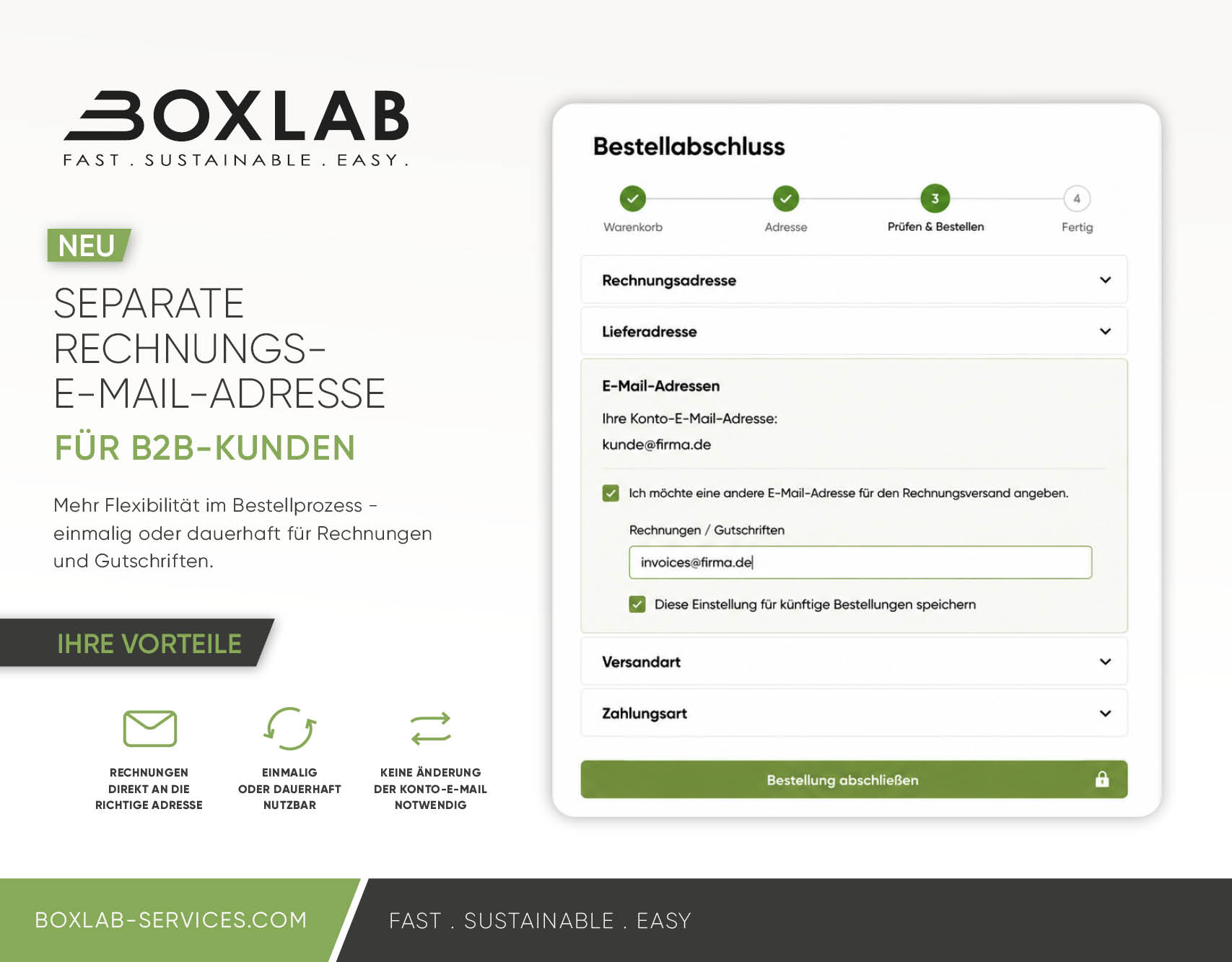
The option is available directly during checkout in the Email Addresses section.

Simply activate the option to use a different email address for invoice delivery and enter the desired address.

If you only want to use the address for the current order, no permanent change is required.

If you want to use it for future orders as well, simply save the setting. The invoice email address can also be managed later in your customer account.

Two options: for a single order or permanently

You can choose how the separate invoice email address should be used.

Use a separate invoice email address for a single order

During checkout, you can enter a different email address specifically for the current order.
This is useful, for example, if an invoice needs to be sent to a particular contact person, department or project mailbox on a one-time basis.

The email address stored for your BOXLAB customer account remains unchanged.


Save a separate invoice email address permanently

If your invoices should always be sent to your accounting department or a central invoice mailbox, you can save a separate invoice email address for future orders.

Once saved, the address will automatically be used for invoices and credit notes associated with future orders.

You can change or reset the address at any time in your customer account.

Frequently Asked Questions (FAQ)

Can I have invoices sent to a different email address?

Yes. In the BOXLAB online shop, you can enter a separate email address for invoices and credit notes during checkout. Your regular account email address remains unchanged.

Can I use a separate invoice email address for just one order?

Yes. You can enter a different invoice email address for a single order without changing the permanent settings in your customer account.

Can I permanently save a separate invoice email address?

Yes. If invoices should always be sent directly to your accounting department or a central invoice mailbox, you can save the separate invoice email address for future orders.

Does this change the email address of my customer account?

No. Your existing account email address remains unchanged. The additional email address is used exclusively for sending invoices and credit notes.

Can I change or remove the separate invoice email address later?

Yes. A permanently saved invoice email address can be changed at any time in your customer account or reset to your regular account email address.

Who benefits from a separate invoice email address?

This feature is particularly useful for B2B customers where purchasing and invoice processing are handled by different people or departments. For example, your purchasing department can place the order while invoices and credit notes are sent directly to accounting or a central invoice mailbox.

New: BOXLAB Blackout Patch – neutralise hazardous goods labels in secondsWhen removal isn’t the best option

In the logistics of dangerous goods, it is not uncommon for labelling to have to be changed or suspended at short notice. In such cases, invalid placards and warning signs must not remain visible, as they may lead to misinterpretations and uncertainty during transport, inspections or, in an emergency, for the emergency services.

It is precisely for situations like these that BOXLAB has developed the new Blackout Patch.

The traditional solution is to remove the existing markings completely. However, in day-to-day work, this is not always the most cost-effective or practical approach. Time constraints, weather conditions, a lack of tools or materials that adhere strongly often make removal a time-consuming process.

The quick fix for invalid placards and warning signs

The BOXLAB Blackout Patch allows existing dangerous goods markings to be neutralised immediately and unambiguously simply by sticking it over them. Rather than having to remove existing placards or warning signs first, the marking is completely covered and thus immediately deactivated. This saves time, reduces the amount of work involved and, at the same time, ensures that the marking, which is no longer valid, is clearly and visibly covered.

Designed for the rigours of day-to-day logistics operations

The BOXLAB Blackout Patch has been specially developed to meet the requirements of the transport and hazardous goods sectors.

The black surface is completely opaque and reliably prevents any markings underneath from showing through. At the same time, the strong adhesive ensures a secure hold even under demanding outdoor conditions.

Request a sample

The polyethylene material used offers the following advantages:

  • high weather resistance
  • oil and dirt resistance
  • strong adhesive strength
  • high flexibility
  • reliable adaptation to flat and slightly curved surfaces

This makes the Blackout Patch suitable for everyday use on vehicles, containers, swap bodies and other means of transport.

Two formats for different applications

The BOXLAB Blackout Patch is available for the two most common applications:

Blackout-Patch für Plakate

Size: 310 x 310 mm

Designed to reliably cover standard placards up to 300 x 300 mm.

Buy now

Blackout patch for warning signs

Size: 450 × 315 mm

Designed to reliably cover standard warning signs measuring 400 × 300 mm.

Buy now

Faster application thanks to the BOXLAB pull tab

Like many BOXLAB large-format patches, the Blackout Patch also features a separate peel-off tab with BOXLAB branding.
Thanks to its special design, the tab remains attached to the backing paper whilst the patch retains its full dimensions. This makes handling considerably easier and enables quick, neat application, even for large-format applications.

When the Blackout Patch really comes into its own

The Blackout Patch was not designed to replace existing procedures. It was developed to solve a problem that arises on a daily basis in practice.

It is particularly useful:

  • for last-minute changes to vehicle markings
  • for vehicles in active service
  • when under time pressure in the transhipment and logistics sectors
  • when immediate neutralisation is required
  • when on-site removal is not cost-effective or practicable

In these situations, the Blackout Patch provides a quick and professional solution with minimal effort.

Conclusion

With the new BOXLAB Blackout Patch, BOXLAB is expanding its range to include a practical solution for the rapid neutralisation of invalid dangerous goods labels.
The combination of opaque material, strong adhesion, weather-resistant design and ease of use makes the Blackout Patch a valuable tool for logistics companies, dangerous goods safety advisers and fleet managers.
When every minute counts, the BOXLAB Blackout Patch offers a simple and effective way to safely deactivate existing placards and warning signs.

Kontakt

Mischa Feig
CEO and Founder

Tel.: +49 174 3199 452

E-Mail: mischa@boxlab-services.com

ARRANGE A CONSULTATION


Warning: Undefined array key 2 in /www/htdocs/w01cdcb8/boxlab-services.com/wp-includes/class-wp-query.php on line 3403

Warning: Undefined array key 3 in /www/htdocs/w01cdcb8/boxlab-services.com/wp-includes/class-wp-query.php on line 3403

Warning: Undefined array key 4 in /www/htdocs/w01cdcb8/boxlab-services.com/wp-includes/class-wp-query.php on line 3403

Warning: Undefined array key 5 in /www/htdocs/w01cdcb8/boxlab-services.com/wp-includes/class-wp-query.php on line 3403

Warning: Undefined array key 6 in /www/htdocs/w01cdcb8/boxlab-services.com/wp-includes/class-wp-query.php on line 3403

Warning: Undefined array key 7 in /www/htdocs/w01cdcb8/boxlab-services.com/wp-includes/class-wp-query.php on line 3403

Warning: Undefined array key 8 in /www/htdocs/w01cdcb8/boxlab-services.com/wp-includes/class-wp-query.php on line 3403

Warning: Undefined array key 9 in /www/htdocs/w01cdcb8/boxlab-services.com/wp-includes/class-wp-query.php on line 3403