Enter a UN number. Get more out of it.

Possibly the only UN number lookup you’ll ever need.

You look up a UN number. Get a substance name. And then have to piece together the rest yourself. Could it be easier? We think so. That’s why we built the BOXLAB ADR 1000 points calculator.

Free to use · no registration · German / English
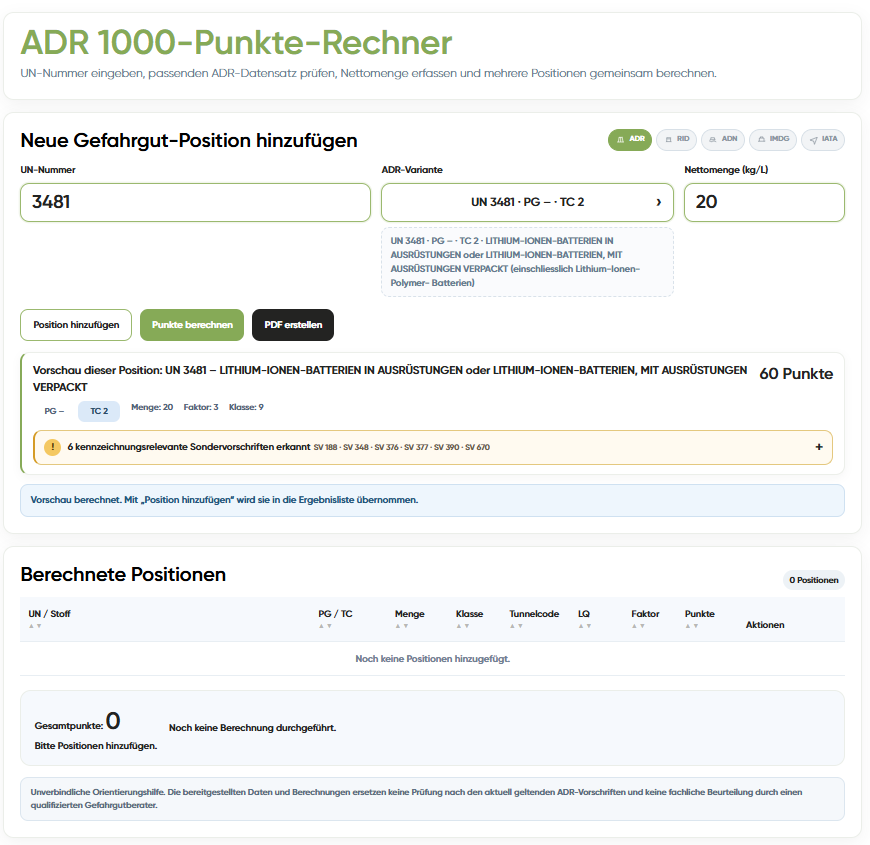
BOXLAB ADR 1000 points calculator: look up a UN number, select an entry and calculate points
Sound familiar?

You’ve found the number. Now the work begins.

When preparing a shipment, “that’s the substance” rarely answers all your questions. Which variant applies? What hazard class is listed? Is there a subsidiary hazard? Which packing group is relevant? And how many points does the actual quantity add up to?

So you move on: another table, another window, another search. Then you still need to find the marking and labelling products and document the result. A quick UN number lookup can soon become a whole research task.

That is the workflow we set out to improve. Our calculator brings several of these steps together in one place: from the stored ADR entry and points calculation to linked dangerous goods marking and labelling products.

More than a search result

One lookup. Several answers.

What exactly is it?Look up a UN number, review the stored variants and select the appropriate entry. Start with the specific entry you need.
How many points is that?Enter a quantity, calculate the item and add further dangerous goods. Individual points and the total remain visible in one overview.
What comes next?Review stored special provisions, open linked marking and labelling products, and print the results or save them as a PDF.
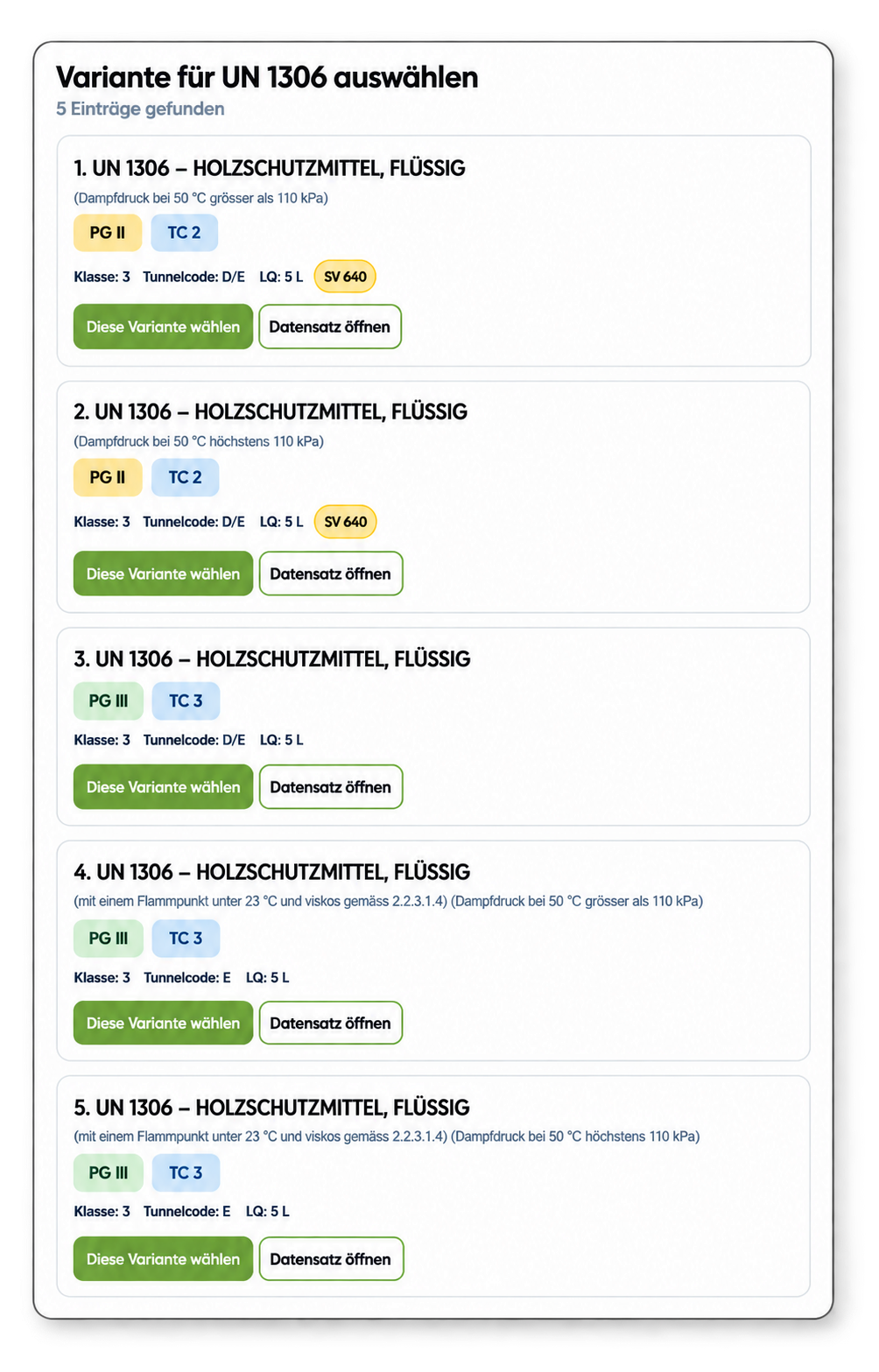
Multiple entry variants for a UN number in the BOXLAB ADR calculator
Same number. Take a closer look.

The first result may not be the right one for you.

The calculator may contain several ADR entries for the same UN number. Simply choosing the first result skips an important part of the selection process.

That is why BOXLAB offers the stored variants for selection. You can compare the information and open the entry. Depending on the entry, available details include the class, packing group, transport category, LQ limit, tunnel code and packing instructions.

Primary and subsidiary hazards are shown separately, making it clear which hazard information belongs to the selected entry.

The name almost undersells it

A 1000 points calculator? Yes. And it keeps going.

Of course, the tool calculates transport points. You can combine several items and enter quantities with up to two decimal places. For many users, that is the starting point.

The practical value continues beyond the calculation: stored special provisions relevant to marking and labelling are displayed as additional information. Where products are linked, you can go straight to the corresponding BOXLAB products — and add them to the shop cart.

The results overview is available in a print-friendly format and can be saved as a PDF using your browser’s print function. Your result becomes more than a number on the screen.

What you can try right away

  • Look up your UN number and review the variants
  • Open the stored ADR information
  • Enter quantities and calculate several items
  • Review additional information on special provisions
  • Open linked hazard labels, placards and other products
  • Print the result or save it as a PDF
For your next shipment

Choose a number you actually need.

The best way to test the calculator is with a UN number from your own day-to-day work. Find the entry, review the variants and enter a quantity. Add a second item and see how the overview builds up.

Whether you ship dangerous goods every day, prepare transport operations or occasionally look up an entry, you need neither an account nor an installation to get started. Open the calculator and begin with your UN number.

Want to explore it first? The ADR calculator feature overview explains the options in detail. For the background, visit our page on the 1000 point rule.

A tool for research and calculation

The calculator uses stored entries and information. You still need to select the appropriate entry and check the specific transport situation. Its output does not replace individual dangerous goods advice or automatically approve a shipment.

Your next UN number lookup starts here.

See how much you can do with a single search.
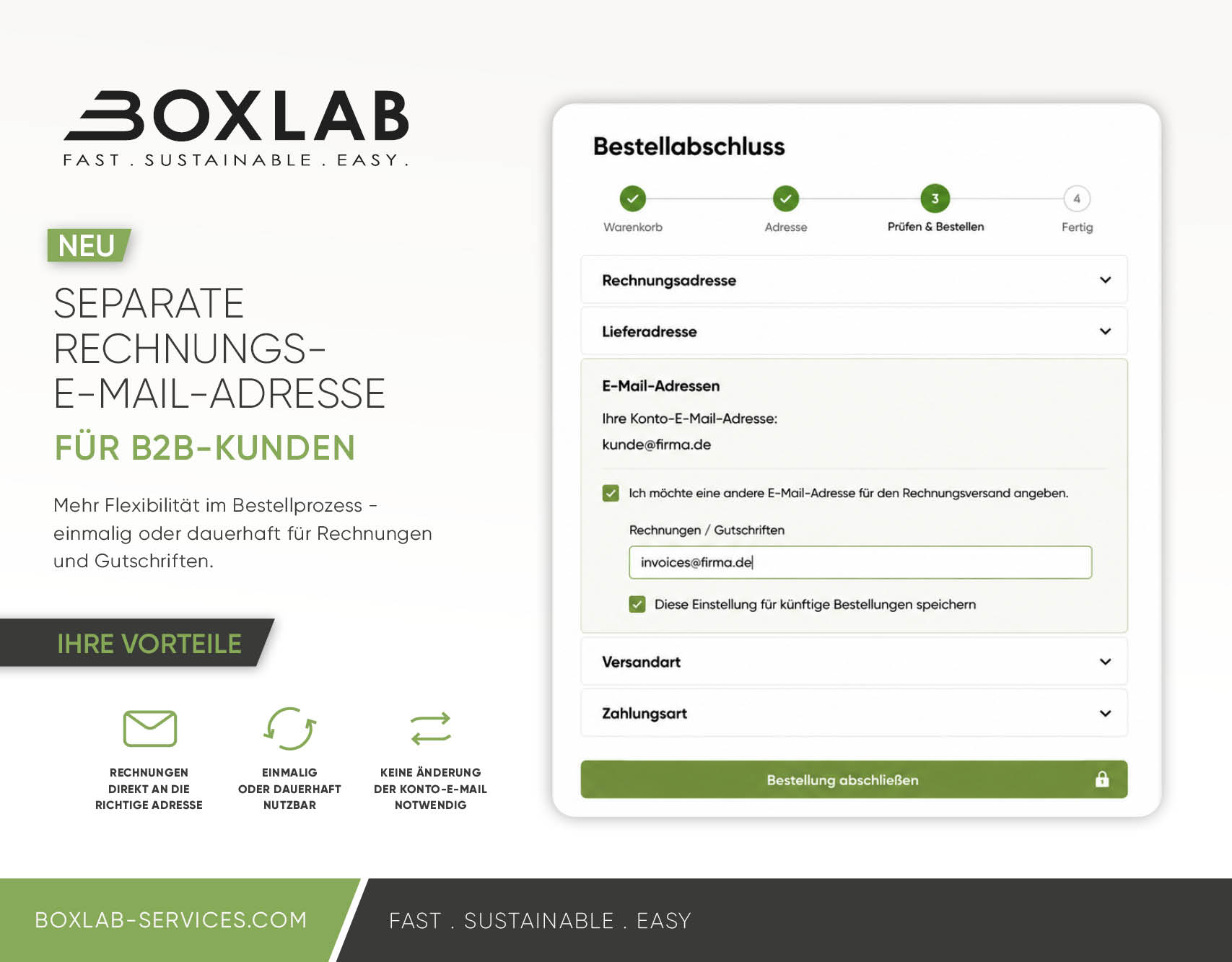
Send Invoices Directly to the Right DepartmentSeparate Invoice Email Address:

In many companies, the person placing an order is not the person responsible for processing the invoice. Purchasing may place the order, while invoices need to be sent directly to the accounting department, accounts payable team or a central invoice mailbox.

BOXLAB now makes this process easier: B2B customers can specify a separate email address for invoices and credit notes without changing the email address used for their customer account.

This keeps ordering and billing processes clearly separated and helps ensure that invoices reach the right department directly.

How to set up a separate invoice email address

The option is available directly during checkout in the Email Addresses section.

Simply activate the option to use a different email address for invoice delivery and enter the desired address.

If you only want to use the address for the current order, no permanent change is required.

If you want to use it for future orders as well, simply save the setting. The invoice email address can also be managed later in your customer account.

Two options: for a single order or permanently

You can choose how the separate invoice email address should be used.

Use a separate invoice email address for a single order

During checkout, you can enter a different email address specifically for the current order.
This is useful, for example, if an invoice needs to be sent to a particular contact person, department or project mailbox on a one-time basis.

The email address stored for your BOXLAB customer account remains unchanged.


Save a separate invoice email address permanently

If your invoices should always be sent to your accounting department or a central invoice mailbox, you can save a separate invoice email address for future orders.

Once saved, the address will automatically be used for invoices and credit notes associated with future orders.

You can change or reset the address at any time in your customer account.

Frequently Asked Questions (FAQ)

Can I have invoices sent to a different email address?

Yes. In the BOXLAB online shop, you can enter a separate email address for invoices and credit notes during checkout. Your regular account email address remains unchanged.

Can I use a separate invoice email address for just one order?

Yes. You can enter a different invoice email address for a single order without changing the permanent settings in your customer account.

Can I permanently save a separate invoice email address?

Yes. If invoices should always be sent directly to your accounting department or a central invoice mailbox, you can save the separate invoice email address for future orders.

Does this change the email address of my customer account?

No. Your existing account email address remains unchanged. The additional email address is used exclusively for sending invoices and credit notes.

Can I change or remove the separate invoice email address later?

Yes. A permanently saved invoice email address can be changed at any time in your customer account or reset to your regular account email address.

Who benefits from a separate invoice email address?

This feature is particularly useful for B2B customers where purchasing and invoice processing are handled by different people or departments. For example, your purchasing department can place the order while invoices and credit notes are sent directly to accounting or a central invoice mailbox.

BOXLAB Services at LogiMAT 2026: Labelling as a system From hazardous goods labels to intelligent label generators

Hazardous goods labels, GHS labelling and legally compliant product labels are among the most critical processes in logistics, industry, chemicals and manufacturing. Today, companies must not only meet regulatory requirements, but also make labelling efficient, scalable and auditable – across different locations, data sources and product lines.

Labels as a system – not as individual products.

At LogiMAT 2026 (24–26 March 2026, Messe Stuttgart), BOXLAB Services (Stand 2D18) will be joining forces with KURZ Digital and EWS to showcase a comprehensive system for modern labelling: from AI-supported label generators and hazardous substance and goods labels to printing service models, material supply and digital enhancements.

BOXLAB Services as main exhibitor – with KURZ Digital and EWS as co-exhibitors

cBOXLAB Services is the main exhibitor at the trade fair and is presenting its overall concept together with strong partners along the entire labelling value chain. This partner network enables a comprehensive view of labelling – from data to layout and materials to the operational printing process.

BOXLAB Services as main exhibitor – with KURZ Digital and EWS as co-exhibitors

  • KURZ Digital – software solutions for automated label creation and data integration
  • EWS – technology and support partner for industrial printing systems and service concepts
  • HERMA – Label materials and special solutions for hazardous goods and hazardous substance labelling
  • cab – Industrial label printing systems
  • KURZ Group / LEONHARD KURZ – Expertise in the field of thermal transfer technology

Labels as a system – not as individual products

In many companies, labels are still procured in isolation, layouts are maintained manually, and printing systems are operated without a clear process structure. Especially in regulated environments, this leads to media breaks, sources of error, and compliance risks.

BOXLAB Services therefore pursues a systematic approach to industrial labelling:

  • scalable production models
  • local on-demand printing with full control
  • modular service and package structures
  • software-supported data and layout processes
  • legally compliant, traceable labelling
  • Integrated material and supply concepts

This creates a robust infrastructure for GHS, hazardous substance and product labelling.

Software core: the AI label generator from KURZ Digital

At the heart of the software is KURZ Digital’s AI label generator, which checks existing product and hazardous goods labels and automatically creates compliant versions.

The solution processes data from ERP systems, safety data sheets (SDS), technical documentation or product databases and converts it into consistent, auditable label layouts.

The practical added value for industry and logistics:

  • Automated GHS and hazardous goods labelling
  • Reduced manual layout work
  • Lower error rates
  • Faster label updates
  • Reproducible processes
  • Improved auditability
  • Scalable labelling across locations

Particularly in HSE/EHS environments (Health, Safety & Environment or Environment, Health & Safety), the generator creates a stable basis for compliance and process reliability.

Digital extension: product information directly on the label

In addition to the generator, KURZ Digital presents the Digital Product Passport (DPP) as an optional extension within modern labelling processes.

The Digital Product Passport generates a QR code with stored product information and digital functions that can be integrated directly into GHS or product labels. This creates a link between physical labelling and digital information structures, for example for documentation, product data or future regulatory requirements.

The Digital Product Passport is a standalone offering from KURZ Digital that functionally complements the label generator and creates additional value for data-driven labelling.

Print @ Office "All Inclusive" – new printing service models

In addition to the software, BOXLAB Services and EWS are presenting a practical concept for the operational printing of hazardous goods and product labels in-house.

The focus is on service-based printing models, such as rental or leasing, combined with clearly defined operating, support and supply concepts.

cThe role of BOXLAB Services

  • Regular, needs-based supply of materials
  • Blank and pre-printed label solutions
  • Placards, warning signs and DIN formats
  • Creation and maintenance of legally compliant layouts
  • Provision of up-to-date print data
  • Integration of individual labelling requirements

The print data is provided directly on the systems so that labels can be produced reliably and in a standardised manner on site.

The role of EWS

EWS complements the model with technical support and system stability:

  • Technical support
  • Operational reliability of printing systems
  • Infrastructure support
  • Continuous supply concepts
  • Support with availability and scaling
  • This creates a resilient printing ecosystem for industrial labelling.

Material and technology expertise within the partner network

Legally compliant hazardous goods labelling requires precisely coordinated materials and printing technologies. HERMA supplies specialised label solutions with coordinated adhesives, resistances and standard-compliant properties for demanding applications.

BOXLAB Services also handles operational processing for HERMA customers in the area of hazardous goods labels, combining material expertise with process reliability.

The KURZ Group complements the system with thermal transfer technology, while cab provides industrial printing systems for robust production environments.

Typical applications

The solutions presented are particularly suitable for:

  • GHS labelling
  • Dangerous goods labels in accordance with international standards
  • Chemical and industrial labels
  • Logistics and shipping labelling
  • SDS-based label creation
  • BS 5609-compliant applications
  • Product labelling with additional digital information
  • On-demand printing in production and warehousing

For whom is this solution particularly relevant?

The concept is aimed at companies that view labelling as a critical operational process – particularly in areas such as:

  • HSE/EHS
  • Hazardous goods management
  • Occupational safety
  • Environmental management
  • Compliance
  • Quality management
  • Logistics
  • Production
  • Technical documentation

Contact and trade fair information

Mischa Feig
PDG et fondateur

Tél. : +49 174 3199 452

E-mail : mischa@boxlab-services.com

LogiMAT 2026
24–26 March 2026 | 9 a.m.–5 p.m.
Messe Stuttgart

BOXLAB Services – Stand 2D18
HERMA – Stand 2D11
cab – Stand 2D21

KURZ Digital and EWS will be present directly at the BOXLAB Services stand.


Warning: Undefined array key 3 in /www/htdocs/w01cdcb8/boxlab-services.com/wp-includes/class-wp-query.php on line 3403

Warning: Undefined array key 4 in /www/htdocs/w01cdcb8/boxlab-services.com/wp-includes/class-wp-query.php on line 3403

Warning: Undefined array key 5 in /www/htdocs/w01cdcb8/boxlab-services.com/wp-includes/class-wp-query.php on line 3403

Warning: Undefined array key 6 in /www/htdocs/w01cdcb8/boxlab-services.com/wp-includes/class-wp-query.php on line 3403

Warning: Undefined array key 7 in /www/htdocs/w01cdcb8/boxlab-services.com/wp-includes/class-wp-query.php on line 3403

Warning: Undefined array key 8 in /www/htdocs/w01cdcb8/boxlab-services.com/wp-includes/class-wp-query.php on line 3403

Warning: Undefined array key 9 in /www/htdocs/w01cdcb8/boxlab-services.com/wp-includes/class-wp-query.php on line 3403